What happens when a 15- year old learns how to deepfake?

Our member Yle, the Finnish public broadcaster, experimented with professional synthetic media tools from Synthesia and Respeecher in the past. Now they tasked one of their interns with a similar experiment. How easy or hard is it to actually use freely available AI tools to create synthetic media? You can read the findings in this article written by the intern himself.
Deepfakes are a fascinating yet terrifying showcase of the direction which modern technology is heading towards. They are getting more accurate by the second, and when the right (or wrong) person gets their hands on some proper software, many would say the result of their work gets a bit too accurate. The two main reasons why people could be a bit frightened by the looming reality of deepfakes are the following: First and foremost identity theft, nobody wants anyone to steal their identity, be that in any shape, way or form. Getting framed for a crime you didn’t commit or losing a dear friend over false fights sounds like horror because facing consequences for events you had no control over and the lack of control exudes a noticeable amount of fear. Secondly, most people have very little knowledge of how the process of creating a deepfake works. This lack of knowledge quickly turns into fear of the unknown. Additionally, have you ever heard prophecies of a(n) ai/robot takeover? Yeah, deepfakes can tap into that fear as well, which amplifies the fear of the unknown since robot takeovers are deeply rooted into that.
Well, personally I’m not all that scared of deepfakes, so I thought it would be interesting to delve a bit deeper in this topic and make a deepfake of my own. Are they truly as intimidating and complex as people say they are? I doubt it. And look at the pros: I would learn a new skill, gain insight on what they’re like from the inside and maybe teach you a thing or two about them as well.
What do I want to achieve? First and foremost I will make a simple video deepfake to the best of my abilities. Along with that video, I’ll create an audio deepfake to go along with it. All of that can be considered the main project. Then, as a sort of an additional challenge, using all of my learned skills, I will create a new model that can be used to deepfake live footage. That challenge is still far away though, so let’s get started with the first part.
Unfortunately I can’t actually do anything without someone to deepfake. I need a target as all deepfakes do. There is a certain order to follow when making deepfakes and choosing a target has to be the absolute first step. I was asked to target Juuso Pekkinen, a Finnish actor that was the target of professionals deepfakes before. I got full permission to do what I needed and also some audio and video files of himself that are specifically suited for this use. And good thing I got them: clearer sound leads to a way clearer fabrication of that same sound. Now with all the external resources I could ever wish for, I actually needed to put something together by myself. So let’s work the best way that I know how: Google it.
Watch an example of a Juuso Pekkinen deepfake created by deepfake professionals (Clicking this link will redirect you to Instagram)
Tools to deepfake
I searched for tools with the simple keywords “Deepfake Software” for the faceswap and “Deepfake Voice” for the voice synthesis. In my case, the broader the search terms are, the better the results, since I didn't know exactly what I was looking for. There are some indicators you can see straight from the title of a webpage that can tell you about its quality. Here, I scrolled down to the first result from the website Github. Products made by actual people work wonders compared to the commercial products produced by companies that only want money. They are free and have generally no limitations as to what you can make. The only problem is that they are also a lot more intimidating and just in general not very user-friendly. That is always a challenge that needs to be tackled when using these kinds of tools.
Now with all the software required downloaded I wanted to start with the video deepfaking portion, since that seemed more fun, but after some thought I realized it was necessary to start with the voice portion if I wanted the lips to match the sound that was coming out. You see, voice deepfaking is unpredictable, so I need to lip sync myself according to the deepfaked audio. And I can’t lip sync if I haven’t made the audio yet. I’m sure there is a way to bypass this issue if you look hard enough, but sometimes the dumber option is a lot easier. Well then, I guess I just have to start with the sound. How hard can it be?
Let’s just say that some things are less difficult and just plainly annoying. This was one of those cases. My worries about the Github downloads being complicated turned out to be more than accurate. I spent more than twice the time that it took to make the deepfake on setting up the software to be able to make it. Don’t get me wrong, downloading the software is still easy and quick, but in order for it to work properly, it requires so many different things, and those then require more things for them to work, and you get the idea. In simple terms, the setup is essentially a gigantic fetch quest with difficult to understand instructions. As I mentioned before, Github software is rarely user friendly. Thankfully, as confusing as the instructions are, at least they’re there. With that struggle out of the way, eventually I got through to the workspace for actually making my audio deepfake.

Thankfully the user interface inside the actual program is relatively easy to use. Just drop the audio files you want to deepfake into the required folder and transcribe them all. After that, all that is required is to choose the desired output text and done! Well, honestly it takes a bit more finesse than that. Since the software isn’t as advanced as many would hope, the text must go through a lot of modifications using trial and error. Only then will it give you the desired audio. In the end, the text I wrote was close to indecipherable, but it worked and I finally have my audio deepfake done.
Visual aspects of deepfake
Now I can finally start on the visual aspect of deepfaking. With the audio available, I lip synced it to the best of my abilities. Doing this is harder than it would seem since the pacing of the audio is very robotic. Thus, on many attempts I said certain parts of the script how a human would actually say them as opposed to the odd fast-paced AI version. Still, after a lot of failed videos, I had one that I deemed good enough. The deepfaking would mess up the lips anyways so it didn’t matter that much.
Thankfully with the video aspect, the deepfake software I used didn't require any additional downloads. Instead, I can just drag and drop videos of both me and Juuso into the “workspace” folder and that is it for the setup. This time however, actually using this software is a lot more intimidating and there are no instructions that come with it. All I have to work with is 56 batch files, with only some of them needing to be executed. Yes, 56. I know clicking on them randomly won’t get me far, so I’ll just have to do what I do best: Find a tutorial on youtube and follow it step by step.
The deepfake process
Heavily detailed tutorials are a lifesaver in these types of situations. They eliminate trial and error almost completely and make sure that you get the optimal result. Still, this task is nowhere near trivial. The tutorial I found was 21 minutes long and I would still have to adapt it to my own sources. However, the instructions are decently clear so let’s just get on with it.
I’m not going to run through the deepfake process in a lot of detail since there are a lot of steps as the 56 batch files would indicate. So I'll just describe the overall workflow I had to go trough:
First, I extracted the videos into a collection of image files and took the general head area from those images. Both of these were done automatically.
Next, I had to separate the head from each image. This took a while as it was done using a combination of manually drawing an outline around a few heads and then letting AI train for the other images using those few outlines as templates. I repeated this step many times so the AI training was as close to perfect as possible. In theory, I could have also manually drawn around each of the heads, but there were over 1000 images so yeah, maybe not.
Then it was time for the longest step: training the AI to actually create the deepfake using the results of the previous steps. For that I opened the corresponding batch file, answered some questions about the training processes settings and waited. Yeah, it’s honestly pretty simple: mostly just waiting. Personally I waited for around 6 hours and if you want an actual high quality deepfake, you’d have to wait for at least a full 24 hour day. At least it was amusing watching the AI progress as I was doing other things in the background.
Finally, after the training was done, I merged the resulting head with my original video and turned it back into a video file. And that’s it!
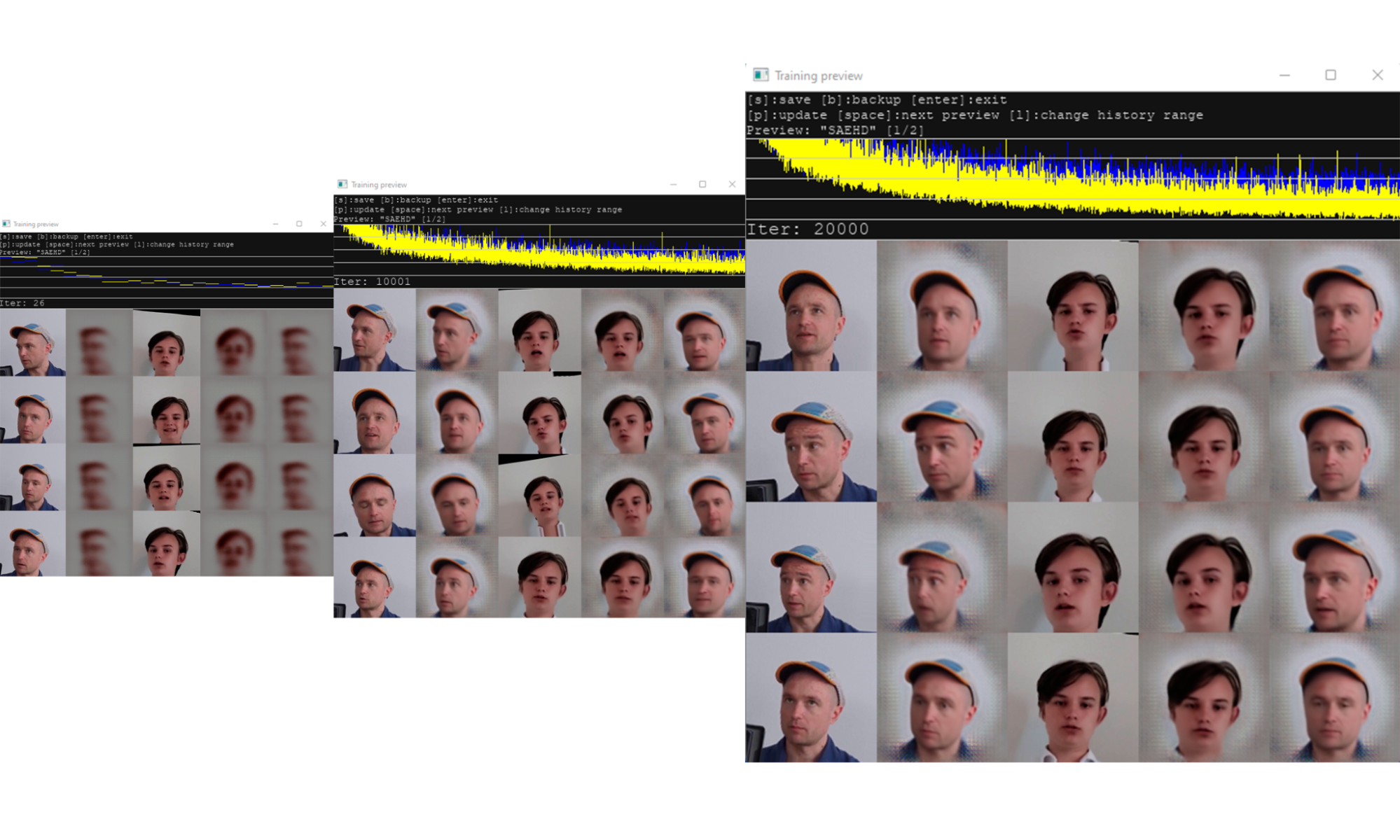
Left: 10 Middle: 10000 Right: 20000
Here is the final result: (Clicking this link will redirect you to YouTube)
Well… It may not be of the quality one might expect. I at least am not particularly fond of the result. Still, you can tell what it is trying to impersonate. And the lips… at least they move. The voice is in my opinion the weakest part. It sounds very robotic. However, the result is certainly closer to Juuso Pekkinen than it is to most other people.
With this result I’m not particularly excited at moving on to a live model. It seems a lot harder and quality control is particularly difficult. But hey, maybe it will go better now that I’m more accustomed to the mechanics of making a deepfake. Anyways, creating a live version will be slightly different than anything previously mentioned so let’s get to work.
Firstly, one huge help with live deepfaking, is that the software I found uses the products of the video deepfaking software I used. So that means I can just use my already finished deepfake right? Yes, I can! However, the result I get by doing that is awful. Just absolutely horrendous. I can’t possibly accept that as finished work so I’ll have to start from scratch. Making a new model can’t be too hard now that I know how to do it.
Still, I want to assure that my work is of utmost quality and so, I’ll find a new tutorial specifically suited for this purpose. And oh no… the only good one is one and a half HOURS long. Whatever I’m good at skimming through things it can’t take that long.
The two main differences that this new tutorial brings are using a pretrained model (meaning the training process is already partially done) and using a face set for the source file. This is great because the face set includes many different faces in different lightings, meaning that now the live model learns in a way that will work with anyone's face and at any time of day. Exactly what I want! Now, the rest of the training is the same as with the video version and soon I can convert it into a model file that can be used in a live setting.
And here is what the finished product looks like in action: (Clicking this link will redirect you to YouTube)
Learnings
Honestly, this one turned out better than I had imagined. With the result of the first deepfake, I had quite low expectations for this one, but it’s actually pretty good. Still, you can obviously tell that it is artificial which in my opinion is a good thing. Also, all of those settings are not a factor I had to deal with. I barely even touched them. Now I have a model that can be used in any video call, google meets ect. Pretty cool!
Overall, what I learned about deepfakes during my journey was that it is a lot easier to create a deepfake than it is to create a good deepfake. I believe anyone who has graduated from primary school can make a deepfake of similar quality to mine. All it really takes is a bit of perseverance.
I also believe that impersonating others using deepfakes is a skill that very few have. So no, not nearly anyone can use deepfakes for the malicious uses people fear. The quality is simply way too low to actually be believable. Instead, deepfakes of this quality are more suited for entertainment purposes. I, for one, have seen many parody videos utilizing deepfakes in a way that is humorous and can’t harm anyone involved.
In conclusion, at least at this moment in time, deepfaking is surprisingly simple even with its intimidating nature. Anyone can deepfake, but nearly no-one can deepfake well enough to cause harm. If you want to deepfake, do it for the amusement of yourself and others. Use it in a way that is fun yet fair. So go on, try it, it isn’t as hard as it seems.
Article written by Miska Aapro.
Credits:
Tutorial Video:
https://youtube.com/watch?v=eWATIYiQZeo
Tutorial Video For Live Deepfake:
https://youtube.com/watch?v=_bc3SPbCdW8
Audio Deepfake Software:
https://github.com/CorentinJ/Real-Time-Voice-Cloning
Video Deepfake Software:
https://github.com/iperov/DeepFaceLab
Live Deepfake Software:
https://github.com/iperov/DeepFaceLive


